
Flipped Learning: Creating Explainer Videos To Make Lesson Time Count

How much of your lesson is spent talking, and how much is spent with students actually thinking?

In content-heavy subjects, teacher explanation can easily consume most of a lesson. By the time students are ready to apply what they have learned, the bell is about to ring. The exam question becomes homework, feedback is postponed and the part of the lesson that may reveal what students really understand is squeezed into the final few minutes.
Flipped learning offers one way of reorganising that time and giving students more independence on their learning journey.
AI does not make a lesson flipped. The teacher decides what content can reasonably move outside the classroom and what learning is worth protecting lesson time for. AI can make that decision easier to put into practice by helping turn existing resources into short video overviews, one page summaries, podcasts, and various other classroom activities.
The students do not need to use AI themselves but they will be completing a short activity that introduces or rehearses the essential knowledge they will need in the next lesson.
What is flipped learning?
Put simply, a flipped classroom reverses part of the usual sequence. Instead of introducing all the new content during the lesson and sending students away to practice it independently, a small and carefully chosen piece of initial content is encountered beforehand for homework. Lesson time can then be used to retrieve, discuss, apply, analyse and evaluate that knowledge.
In examination terms, some of the AO1 input can take place before the lesson, leaving more classroom time for AO2 and AO3: applying knowledge, interpreting unfamiliar information, analysing data, evaluating evidence and improving examination answers.
The teacher has not been removed from the learning. Teacher expertise has simply been repositioned so that it is available during the part students may find most difficult.
Why might I want to flip part of a lesson?
For me, the attraction is not simply covering more content. It is making better use of the time when I am actually in the room with my students. When I am explaining from the front, I can ask questions and look for puzzled faces, but I cannot see every student's thinking. Misconceptions often become obvious only when students begin to use the knowledge. That is when my input is most valuable.
A flipped approach can create more time for students to explain their reasoning, tackle unfamiliar questions, compare answers and act on feedback while I can listen, question, scaffold and correct. The difficulty is that preparing videos, notes, retrieval questions and follow-up activities can become another workload problem. That is where AI becomes useful.
Where can AI support flipped learning?
Once I have decided that a topic and class might suit a flipped task, AI can help at several stages.
1. Decide what is suitable to flip
Not every part of a topic should be learned independently. I provide Gemini Notebook with the relevant specification section, teaching notes or PowerPoint and ask it to help identify:
core factual knowledge students could reasonably encounter before the lesson
concepts that need direct modelling or questioning
likely misconceptions
higher-demand application that would benefit from teacher support
That gives me a useful starting point for deciding what, if anything, should move outside the lesson.
2. Turn existing resources into flipped learning homework tasks
I start with resources I already use and adapt them for a very specific purpose using Gemini Notebook. A PowerPoint or set of notes can be tailored into:
a short explainer video
a brief overview video
a slide deck
guided notes
briefing notes
an audio overview
flash cards
a podcast
The resource only needs to provide the essential knowledge students need for the classroom activity that follows.
3. Create a structured preparation task
Simply telling students to “watch the video and make notes for homework” leaves too much to chance. Gemini Notebook can help create a short task such as three to five retrieval questions, a key-word table, an unlabelled diagram, a comparison table or one example students need to explain. I can also specify that the whole task should take no more than 10 or 15 minutes.
4. Create a readiness check
At the beginning of the next lesson, I need to know if students have grasped the content and are ready to move on. AI can help generate, for example, a short low-stakes multiple choice quiz (which can be imported into MS Forms) based on the essential knowledge and likely misconceptions. The responses then tell me whether we can move into application or whether a brief corrective explanation is needed first.
5. Design a follow-on activity that makes flipping worthwhile
This is the most important part. There is little point moving content out of the lesson simply to create more time for another passive task. AI can help draft AO2 and AO3 questions, case studies, data-analysis activities, comparison tasks, diagrams for annotation, scenarios or sample answers for students to evaluate. This is where the reclaimed classroom time earns its value.
What does this look like in practice?
I will use my AS1 Nutrition and Food Science lesson on protein complementation as my example. Normally, a significant part of the lesson could be spent explaining indispensable and dispensable amino acids, HBV and LBV protein, limiting amino acids and what protein complementation is. Instead, I moved a small amount of that AO1 content into an activity for homework, prior to the lesson.
The flipped part
My students watched a short explainer video, generated in Gemini Notebook, for homework, and completed a structured task covering the content. I also included three short retrieval questions at the end of the video.
At the start of the next lesson
A brief AI-generated MS Forms quiz, with automated marking, checked whether the essential knowledge was secure. I addressed any misconceptions before moving on.
The follow-on task
Students then used the knowledge they had encountered before the lesson to complete a more demanding application task. Depending on the subject you are teaching, this might involve solving a problem, analysing a source, designing a product, evaluating a case study or applying a concept to a new situation.
They could be asked to:
apply their knowledge to a new context;
explain the reasoning behind their decisions;
justify their choices using subject-specific knowledge;
compare possible responses or solutions; and
evaluate and improve their original work.
The lesson could finish with an examination-style or extended application question. This is the part of the learning where I most need to be present. I can listen to students’ reasoning, identify misconceptions, question their choices and help them express their ideas with the precision required by the subject or course.
The preparatory task introduces the essential knowledge, but the lesson is where students learn how to use it.
How to create an AI-generated explainer video
To create the pre-lesson resource I used an existing PowerPoint as the source for the AI-generated explainer. I uploaded my Protein PowerPoint to Gemini Notebook, and generated a Video Overview in Explainer format. It took approximately 7-8 minutes to complete the task. The PowerPoint became the source for a new video with its own narration and visuals. It did not simply add narration to the original slides.
Accessing Gemini Notebook in Northern Ireland
If Gemini Notebook is available through your C2k Google account, I would suggest using that managed account for school work rather than creating a separate personal account.
Here is my simple workflow:
Check that the PowerPoint contains accurate, specification-aligned information.
Upload the .pptx file as a source.
Open the Studio panel and select Video Overview:
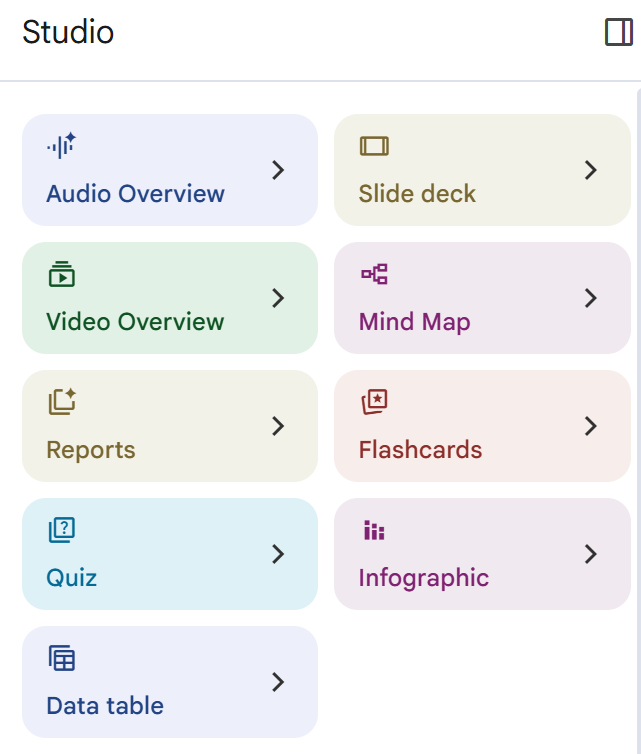
Choose the Explainer format:

Customise the topic by providing detailed instructions about the students, content, terminology and length.
Review the finished video before sharing it.
Review the finished video and, if necessary, adjust the instructions and regenerate it.

Customising the video with a well-structured prompt.
How to write a useful explainer video prompt
A useful prompt should:
identify the students' age, subject, course and level of study
state exactly what students should know or understand after watching
identify the uploaded sources the AI should use
set an appropriate length, format, tone and language
list the concepts in the order they should be explained
specify the specialist terminology that must be used accurately
request useful diagrams, comparisons or animations
include relevant subject or real-life examples
identify common misconceptions that should be corrected
set boundaries around content that should not be added
finish with a short recap and retrieval questions
The finished video was still a draft until I checked the narration, terminology, examples and visuals against the original source and specification and made relevant changes.
Sharing the video with students
Students do not need access to Gemini Notebook to watch the finished video. Once I check it, I download the video and share it through the school's approved learning platform (I use OneNote).
For a class using Microsoft Teams, I would:
open the completed Video Overview in Gemini Notebook
download the video file
upload it to the class Files area, OneDrive or SharePoint
copy the sharing link
check that access is limited to the relevant students or school organisation
add the link to a Teams post, assignment or insert the link in Class Notebook
test the link before setting the task
This keeps students within the school's usual platform and avoids giving them access to the rest of my notebook or its uploaded sources. The link should also come with very clear instructions for the students.
The short time limit matters. Flipped learning becomes much less appealing if a 10-minute preparation task quietly turns into 40 minutes of homework.
What if students do not prepare?
This is probably the biggest practical concern for many secondary teachers. If a lesson depends entirely on preparation that has not happened, the whole plan can quickly fall apart. Flipped learning does not automatically create independent learners. Students need to be taught how to prepare, and some accountability needs to be built into the routine.
I would start by:
trying one flipped lesson rather than changing a whole unit
keeping preparation to around 10 or 15 minutes
making the expected output very clear
using a short quiz at the beginning of the next lesson
providing captions, a transcript or printable alternative where needed
giving students access to the material well in advance
having a short catch-up route for anyone who arrives unprepared
The catch-up route should not require me to repeat the entire explanation while everybody else waits. A transcript of the video or briefing document could allow those students to acquire the essentials while the prepared group begins the main activity. If most of a class repeatedly arrives unprepared, that tells me something too. The preparation may be too long, too difficult, inaccessible outside school or simply unsuitable for that class. In that situation, continuing to flip the lesson because the model should work would make little sense.
Start with one lesson
What appeals to me about using AI for flipped learning is the possibility of making an existing teaching approach easier to try. My starting point would be to choose one lesson where teacher explanation currently takes up a lot of lesson time and the most valuable student thinking is being rushed.
The success of the approach does not depend on how impressive the AI-generated video looked. It depends on what happens next: the retrieval check, the AO2 or AO3 task, the questioning, the misconceptions uncovered and the feedback students receive.
After trying the approach, ask students for brief feedback. It is useful to know whether they could access the resource easily, whether the preparation was manageable and whether it helped them begin the classroom task with greater confidence. I would combine this with evidence from the opening retrieval check and the quality of their application work. Completing the task would not, by itself, show that the approach had improved learning.
The real test is not whether the lesson looks innovative. It is whether students spend more of it thinking, applying, questioning and improving.


